


Demo account · step by step
You finished the course.
You finished the course.
Now what?
The next step is not a live account. The next step is to execute the strategy a hundred times without it costing you anything.
This page is the complete guide: from registering with the broker to an open gold chart in MetaTrader 5. Every step has a screenshot.
Same market. Same platform. Without the price of mistakes.
A demo account is an exact copy of a live one — the same real-time prices, the same spreads, the same platform, the same order execution. The only difference is the money: it is virtual.
This is not a toy and it is not "the easy version". It is the training ground where you build the mechanics before you add the hardest part — the emotion of real money.
Mistakes are free
You will enter early. You will move the stop. You will take too big a lot. Everyone does these things — the point is to do them here, not with your money.
Repetitions build skill
Recognising a setup is not knowledge, it is skill. Skill comes from hundreds of repetitions — and almost all of them should be free.
The journal starts here
Record every trade from day one. After a hundred entries you will know more about yourself than any book can teach you.
How long
A minimum of one month on demo and at least fifty trades by the rules before you even think about real money.
The goal is not profit on demo
If you made 300% on a demo account in a week, that means nothing — most likely you took excessive size because the money was not real.
Trade the demo at the size you would trade a live account. The goal is clean execution by the rules, not a number at the end.
Read this before you continue
We get a lot of questions asking which broker we use and where the same conditions are available. That is why we show IC Trading specifically — the conditions match ours and you can start at 1:500 leverage.
Nobody is obliged. A demo account with any other broker does exactly the same job. If you already have a broker you like — use it and skip the first part.
For transparency: we are an IC Trading partner and the link below is a referral link. It changes nothing for you and costs you nothing extra.
Registering with the broker
First you create a profile. It is free, requires no deposit and takes about three minutes.
Open the registration
Scan the code with your phone or use the link below.
https://www.ictrading.com?camp=871901
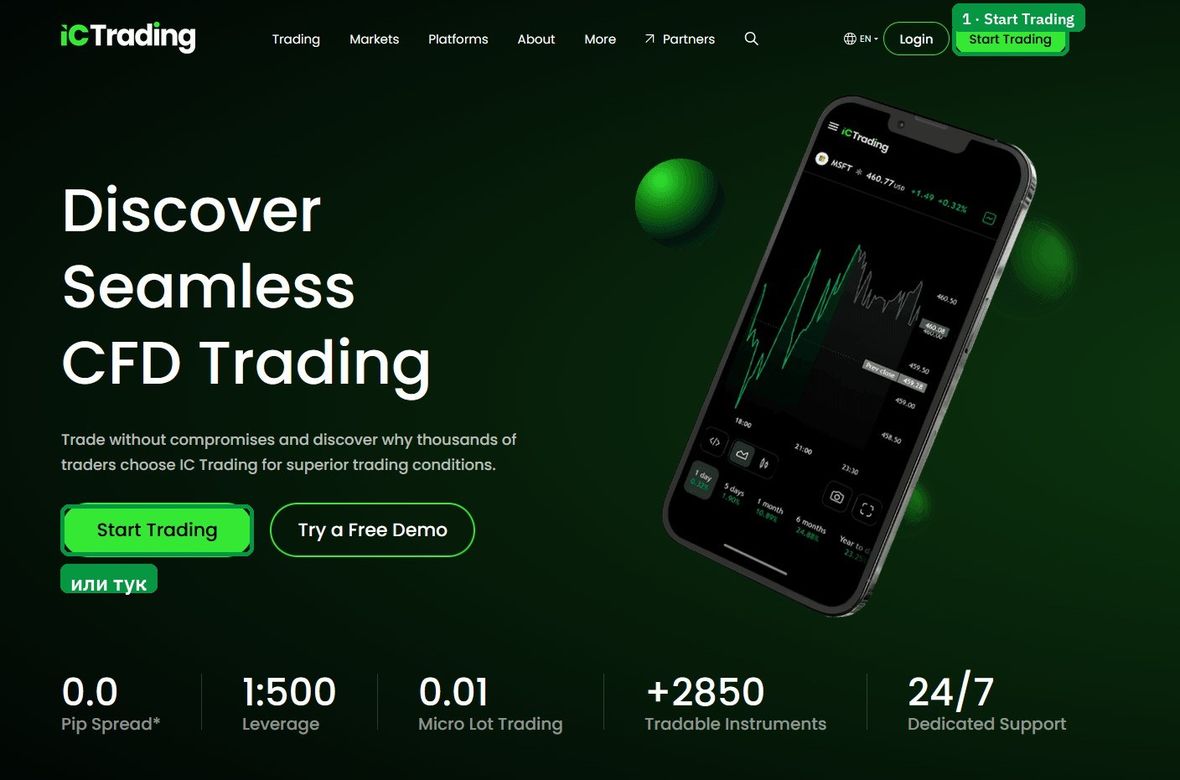
Click “Start Trading”
Once you open the link you land on the broker's homepage. The green button at the top right takes you to registration.
2
Fill in your details
The form is in English. Here is what each field means.
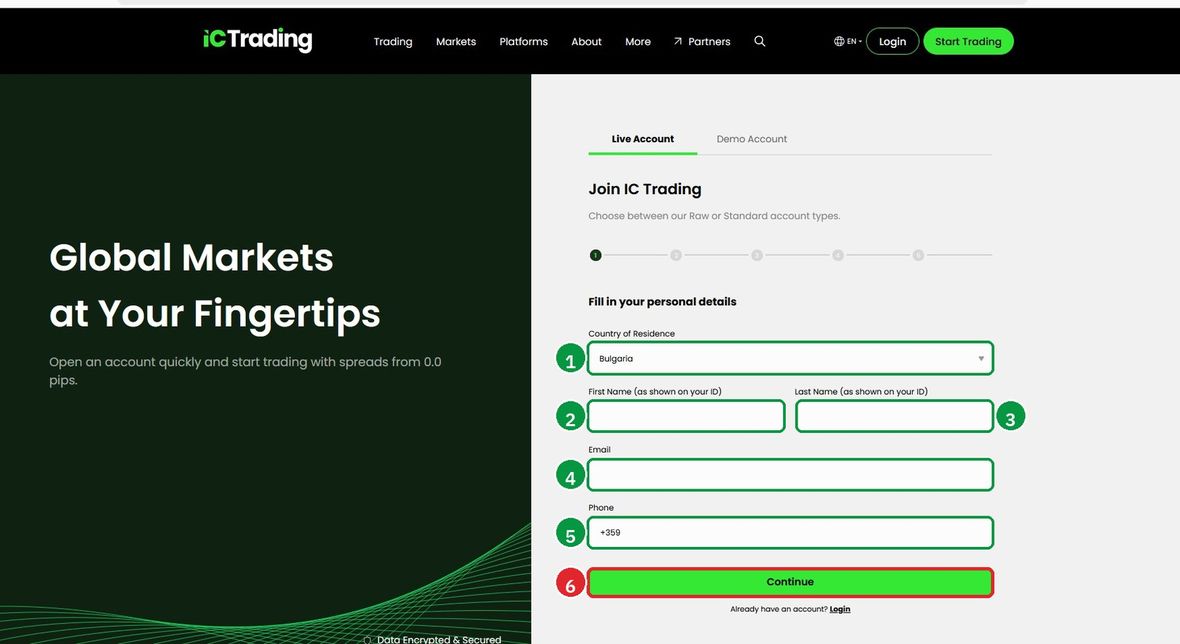
- 1 · Country of Residence
-
Your country of residence. Choose
Bulgaria. - 2 · First Name
- First name — exactly as shown on your ID document, in Latin letters.
- 3 · Last Name
- Last name — also in Latin letters, as in the document.
- 4 · Email
- A working email. The confirmation and the account details arrive there — do not use an address you cannot access.
- 5 · Phone
- Phone with country code. The field already shows your country code — add the number without the leading zero.
- 6 · Continue
- The green button. After it you receive an email with a confirmation link.
Confirm your email
Open your inbox and click the link in the message. If you do not see it within a few minutes, check the Spam or Promotions folder.
Creating the demo account
You are now inside your profile. Next you create the demo account itself — it is separate from the profile.
3
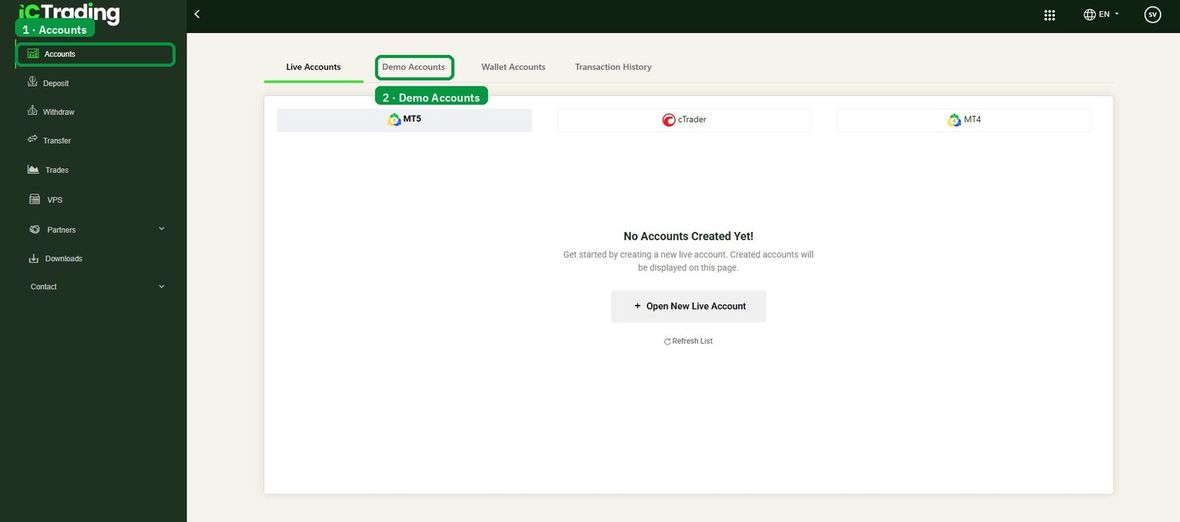
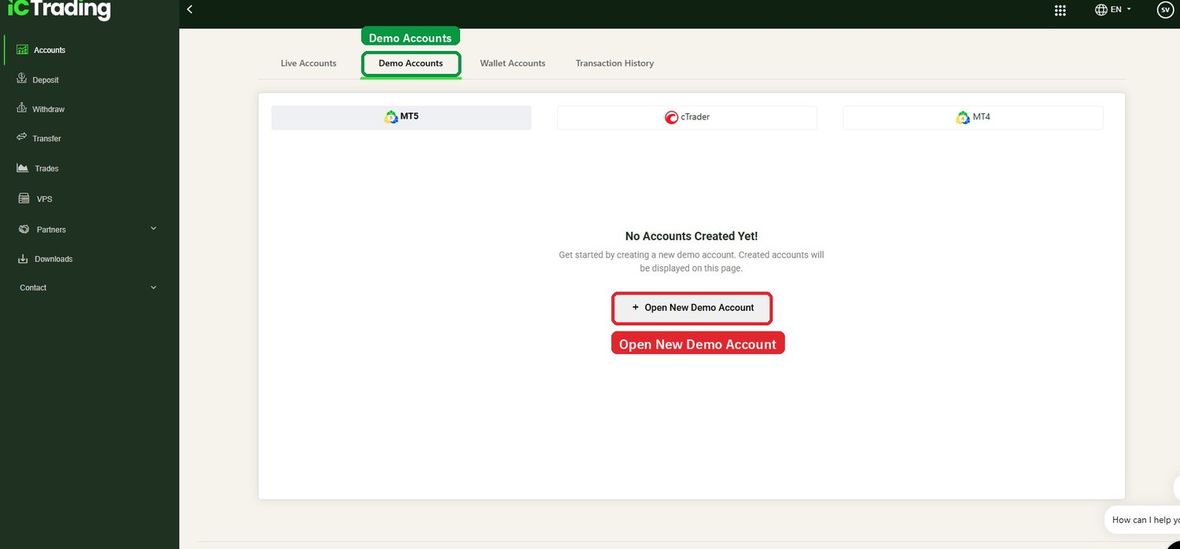
Accounts → Demo Accounts
From the left menu choose Accounts, then at the top switch from the Live Accounts tab to Demo Accounts.
4
Set the parameters
Here it matters that you pick exactly these values, so they match the conditions we work under.
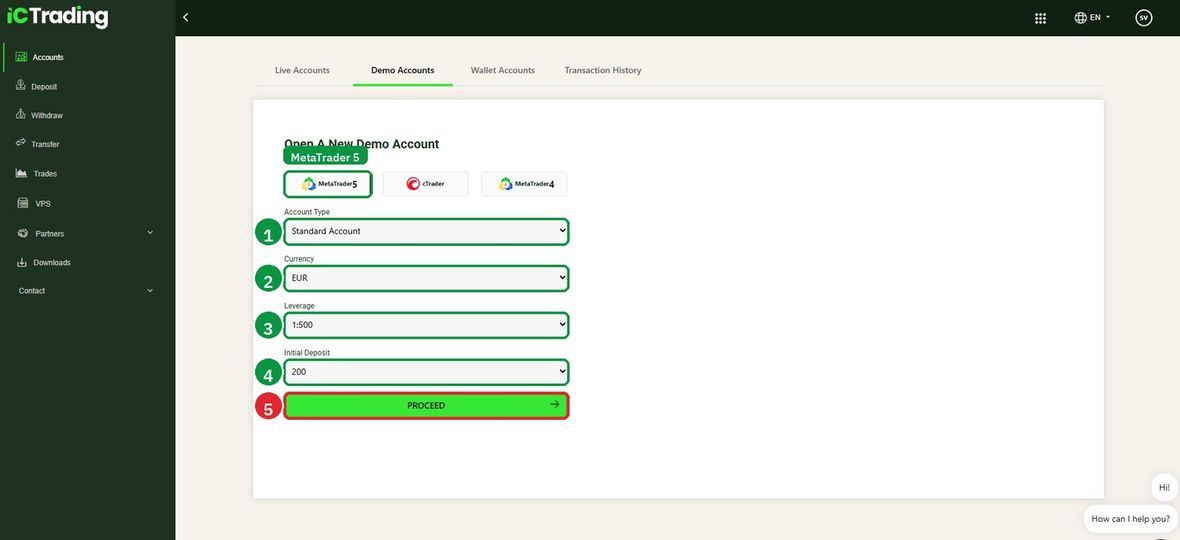
- 1 · Account Type
Standard Account- 2 · Currency
EUR- 3 · Leverage
1:500— this is the leverage we work with.- 4 · Initial Deposit
200— virtual euros. This is also the smallest amount the platform allows.- 5 · PROCEED
- The green button. The account is created immediately.
Why exactly 200 euros
Because it is close to the amount you would realistically start with. A demo account with 100,000 euros trains nothing — at that size every position looks harmless and you build no feel for risk.
5
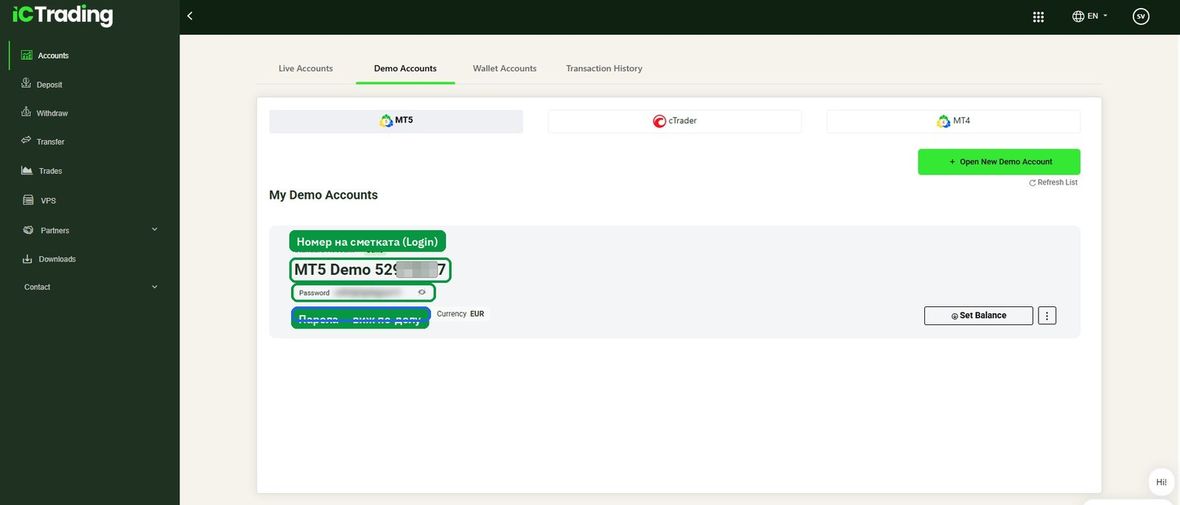
Get your login details
The account now appears in the list. You need details from two places — pay attention here, this is where most people get stuck.
CapitalPointTrading-Demo.
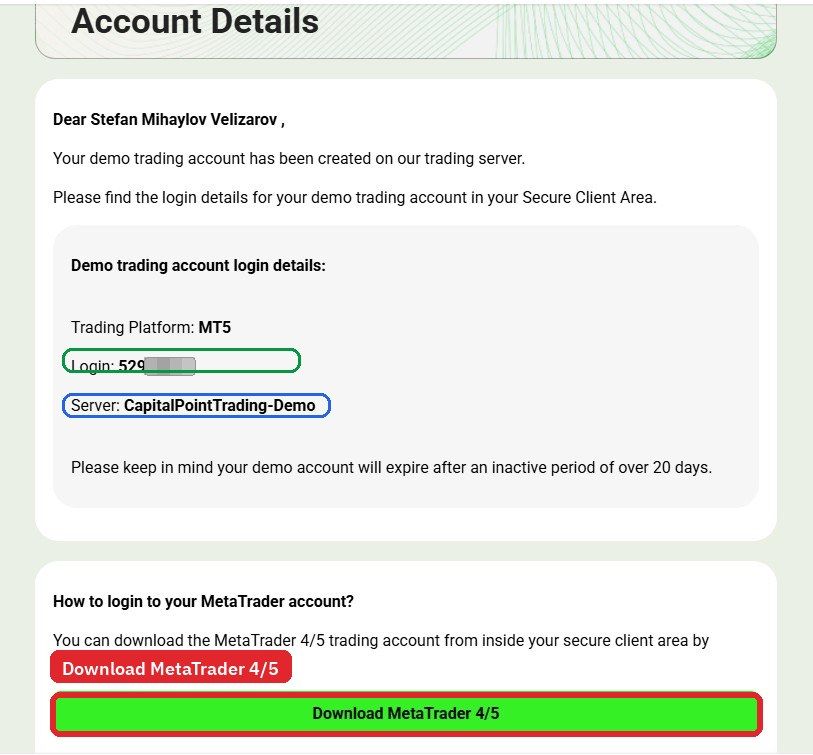
The password is not in the email
It is hidden in your profile, under Demo Accounts, right below the account number. Click the eye icon to reveal and copy it.
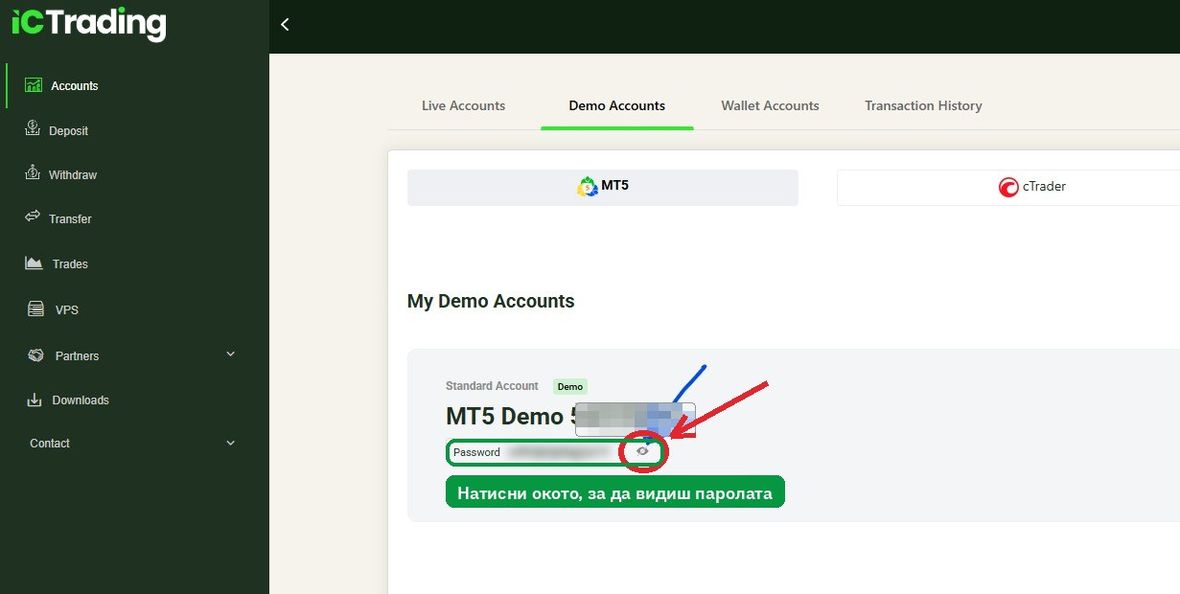
Write down all three
- Login — the account number (digits only)
- Password — from the eye icon in your profile
- Server —
CapitalPointTrading-Demo
Downloading MetaTrader 5
The platform is free. Download it from the official MetaQuotes site.
6
Download and install
Choose the version for your operating system.
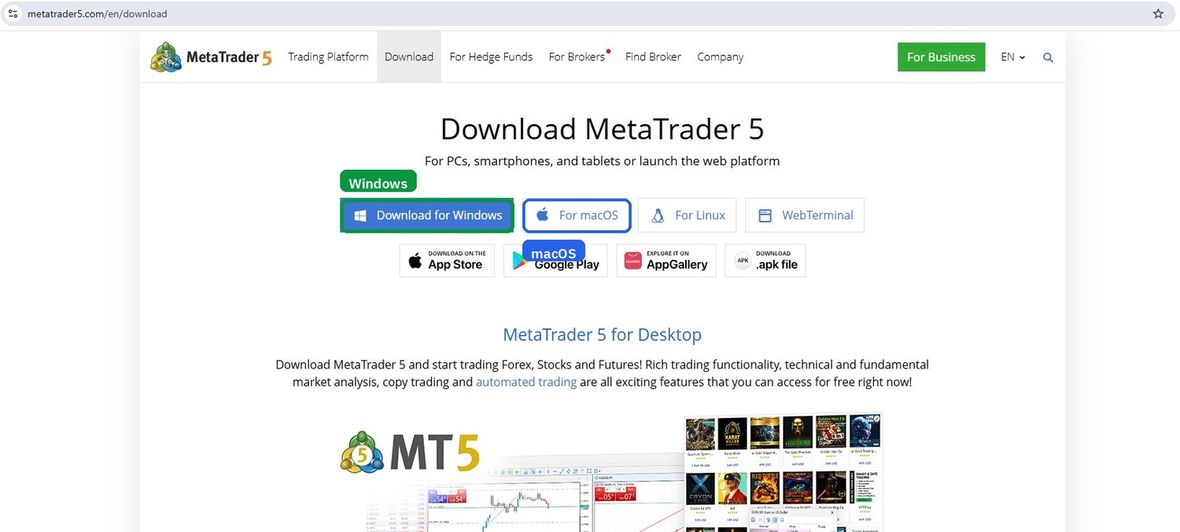
- After downloading, find the file in your Downloads folder.
- Double-click the icon to start the installation.
- Accept the terms and wait for it to finish. The platform opens by itself at the end.
Logging into the platform
Now you connect the demo account to MetaTrader 5. It takes under a minute.
7
Find the server
In the open platform: top left File → Open an Account.
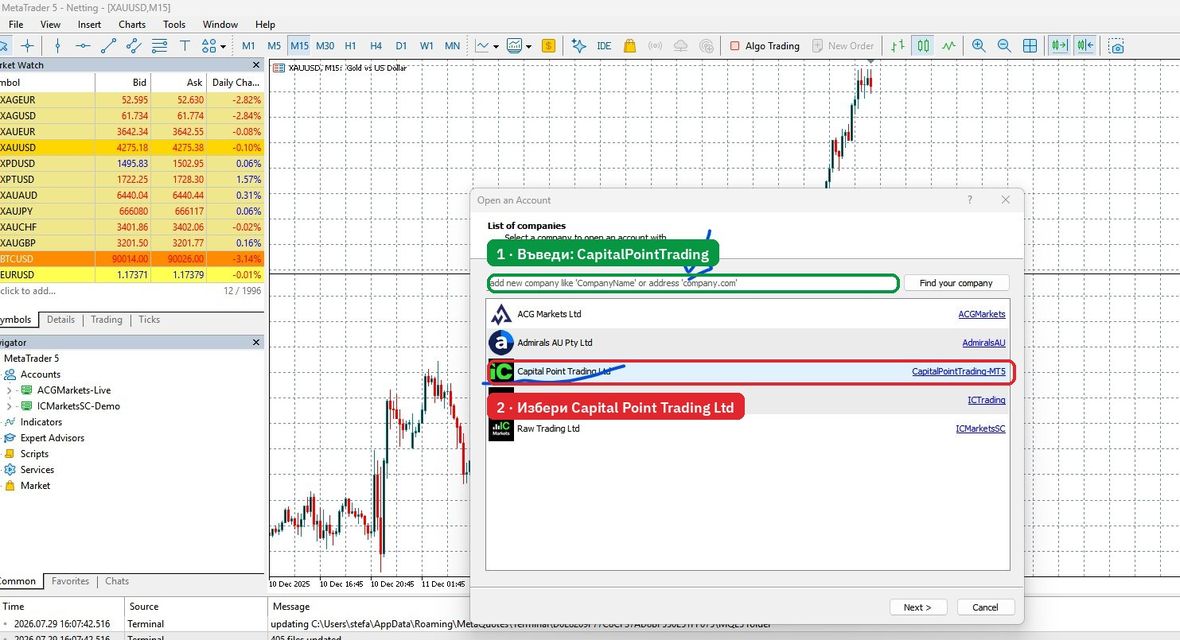
CapitalPointTrading and select Capital Point Trading Ltd from the list. Then press Next.
8
Enter your details
Choose the third option — connect with an existing account.
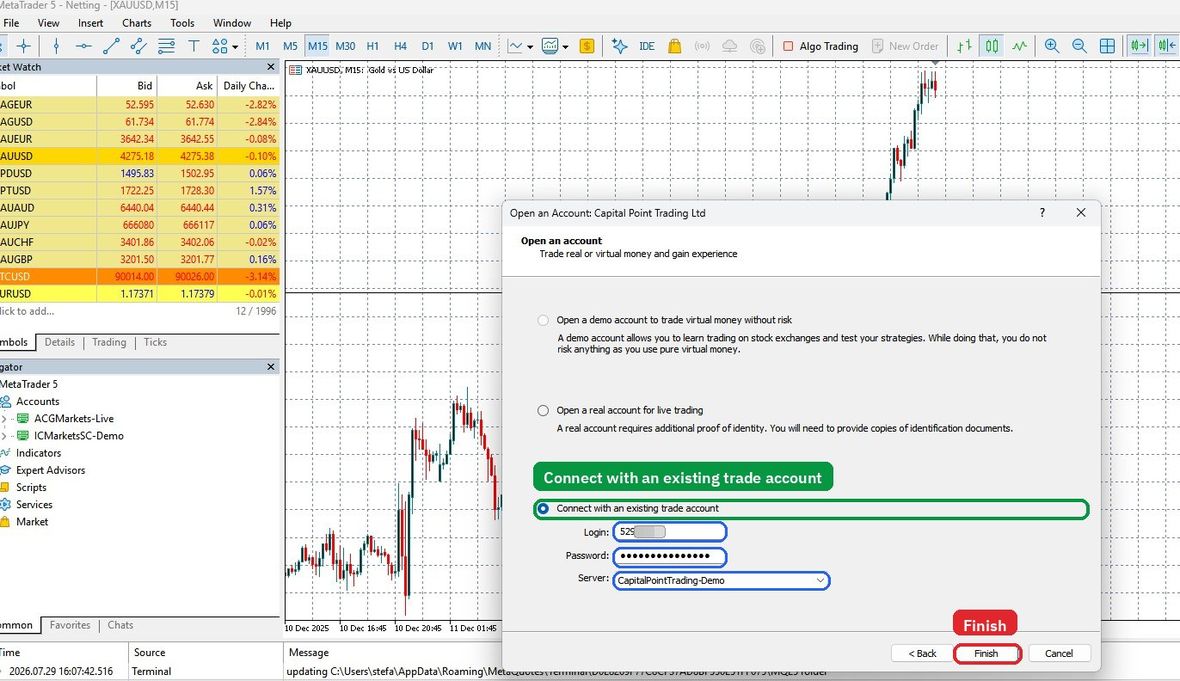
- Login
- The account number from the email or your profile.
- Password
- The password you revealed with the eye icon.
- Server
CapitalPointTrading-Demo
If it does not connect
Check three things: no stray space at the start or end when pasting; the server ends with -Demo, not -MT5; and that you did not mix up another account number.
Open the gold chart
9
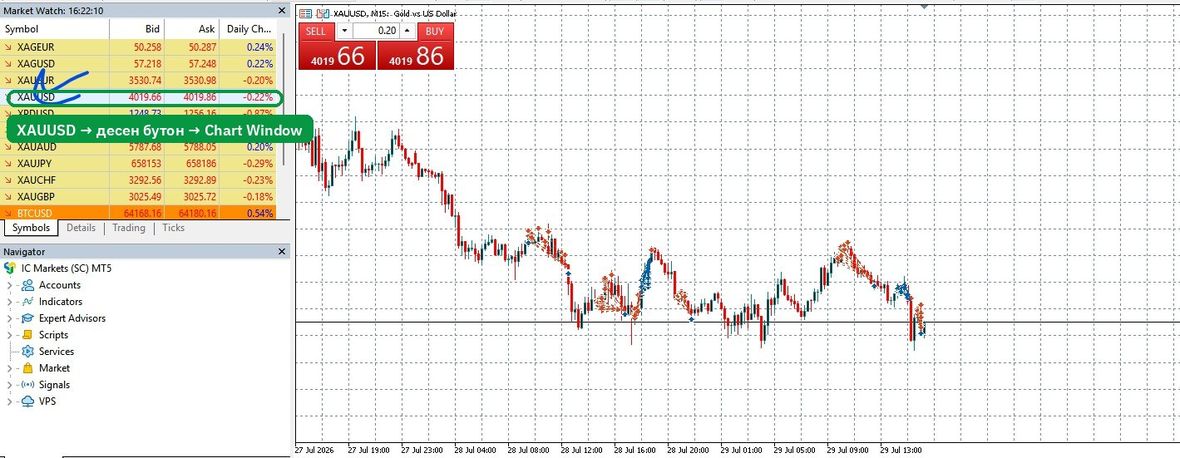
XAUUSD → Chart Window
In the Market Watch panel on the left find XAUUSD, right-click it and choose Chart Window.
First steps on the chart
- Remove every indicator — the chart should be clean.
- Save layouts for 4 hours, 30, 5 and 1 minute.
- Define the four-hour trend and write it down before looking at anything else.
- Do not open a trade on day one. Just watch and mark.
Live help
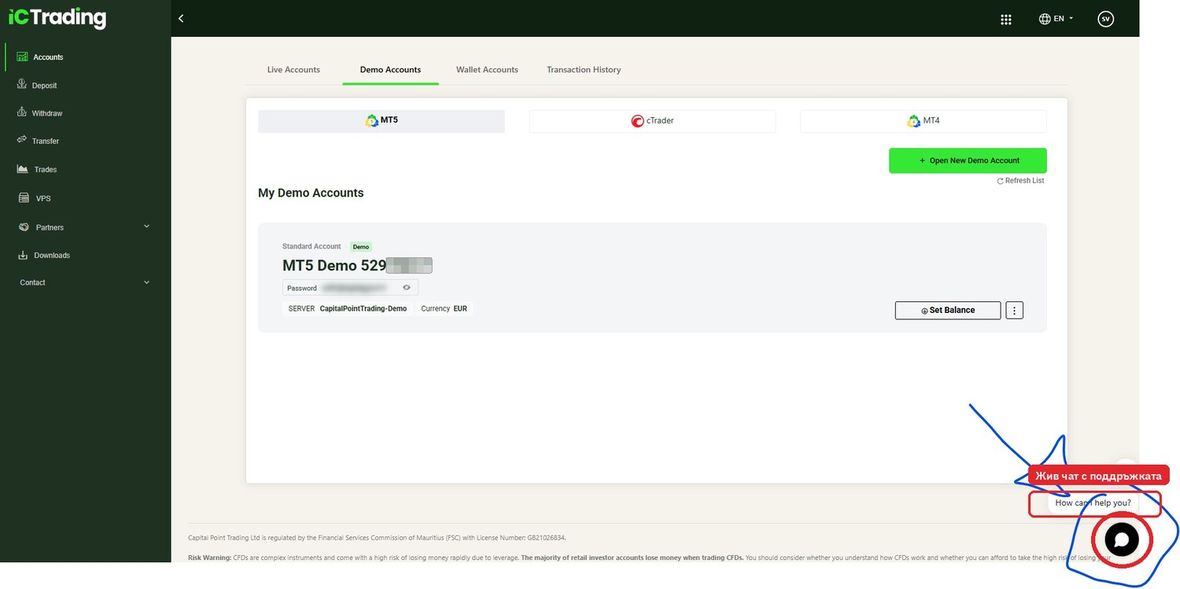
The broker has a support chat at the bottom right of every page inside the profile. They reply quickly and can help with anything around the account and the platform.
Do not speak English? Not a problem.
The platform and support are in English, Spanish and Portuguese. If your English is shaky, use an AI assistant such as ChatGPT or Gemini to translate in real time.
It works like this: write your question in your own language, ask for an English translation, paste it into the chat. Copy their answer back and ask for a translation. It takes seconds and works very well.
Questions we get
Does the demo account cost anything?
No. The registration, the demo account and MetaTrader 5 are all free. No deposit is required and no card is entered.
Do I have to use this specific broker?
No. We show it because the conditions match ours and we receive a lot of questions. A demo account with any broker does the same job — what matters is that it offers XAUUSD and MetaTrader 5.
Does the demo account expire?
Yes. If it is not used for more than 20 days it is deactivated. Creating a new one takes a minute and you can do it as often as you like.
Can I use it on a phone?
Executing trades, yes. Analysis, no. To mark zones and read structure you need a screen where you can see enough candles at once.
When should I switch to real money?
When you have at least fifty recorded demo trades and over eighty per cent of them were executed by the rules — regardless of the result. You judge yourself on execution, not on profit.
And when you do switch, start with the smallest amount you are comfortable parting with.
Why 1:500 leverage and not lower?
Because on a small account higher leverage frees up margin and lets you trade a correct position size. It is important to understand that leverage in itself is not risk — risk comes from the lot size you actually open.
An account at 1:500 trading 0.01 lots is safer than one at 1:30 trading 0.50 lots.
Now it is your turn
The setup takes ten minutes. The skill takes months. The difference between those who get there and those who do not is that the first group starts today and writes everything down.
Risk warning: Trading contracts for difference (CFDs) carries a high level of risk and can result in the loss of all committed capital. The majority of retail accounts lose money. This page is educational and does not constitute investment advice, a recommendation, or a solicitation to trade. TradoCademy LLC is not a licensed investment firm and does not provide investment services. We are an IC Trading partner and links to the broker are referral links — this costs you nothing extra and does not oblige you to use this particular broker. Consider for yourself whether you understand how CFDs work and whether you can afford the high risk of losing money. Capital Point Trading Ltd is regulated by the Financial Services Commission (FSC), Mauritius.